
Type your domain. Watch every template become yours.
Enter a work email or company domain and we pull your logo and brand colors into every signature template at once. Pick one, copy it, done. Roll it out to the whole team when you are ready, one brand, a personal link for everyone, and proof of who installed it.
Rolling this out to a team? One master template, personal links for everyone, proof of who installed it.
Signature tools all share three habits
The category settled into a playbook years ago: price per seat, plug into your inbox, and call the job done at “deployed”. We built around all three.
Per-seat pricing
The bill grows every time the company does. A 50-person team on a $5-per-seat tool pays $3,000 a year, and climbs with every hire.
A key to your inbox
Most tools deploy through an OAuth grant, a mail-flow rule, or a browser extension that can read your email. IT has to security-review all of it.
“Deployed”, never checked
Signatures get pushed and dashboards go green, but nobody confirms what actually lands in a recipient's inbox.
No extension. No OAuth. No inbox access.
Other tools ask you to trust them with your email. We designed around a simpler promise: there is nothing to trust. Signatures are built here and pasted into each person's own email client, so your mail never touches our servers.
Rollout happens through personal links, not admin consoles: no directory sync, no mail-flow rules, no per-machine installs.
Because we never hold mailbox tokens, a breach of us can never become a breach of your email.
What we never touch
- Your inbox or sent mail
- Mailbox OAuth tokens
- Your employee directory
- Mail routing or delivery
- Browser extensions
How it works
Admin sets the template
Pick a starter from the template library, lock the logo, colors, and layout. This becomes the company standard, nothing for teammates to design.
Everyone gets a personal link
Invite the team by email. Each person opens their own link, fills in their name and title, and copies their finished signature.
Verified installs show up on the dashboard
We check inbound email for each teammate's signature and mark it installed, pending, or needs attention right on the dashboard.
Deployed isn't installed
Most signature tools stop at handing you HTML. Every workspace here gets a private check address: send a test email, or just wait for a teammate's next real one, and we scan it for the signature's image URL. No OAuth, no browser extension, no access to anyone's inbox, just proof of who installed it and who still needs a nudge.
Installed
Confirmed in a real, sent email.
Pending
Invited, no confirmation yet.
Needs attention
An email arrived without the current signature.
One master template. Zero drift.
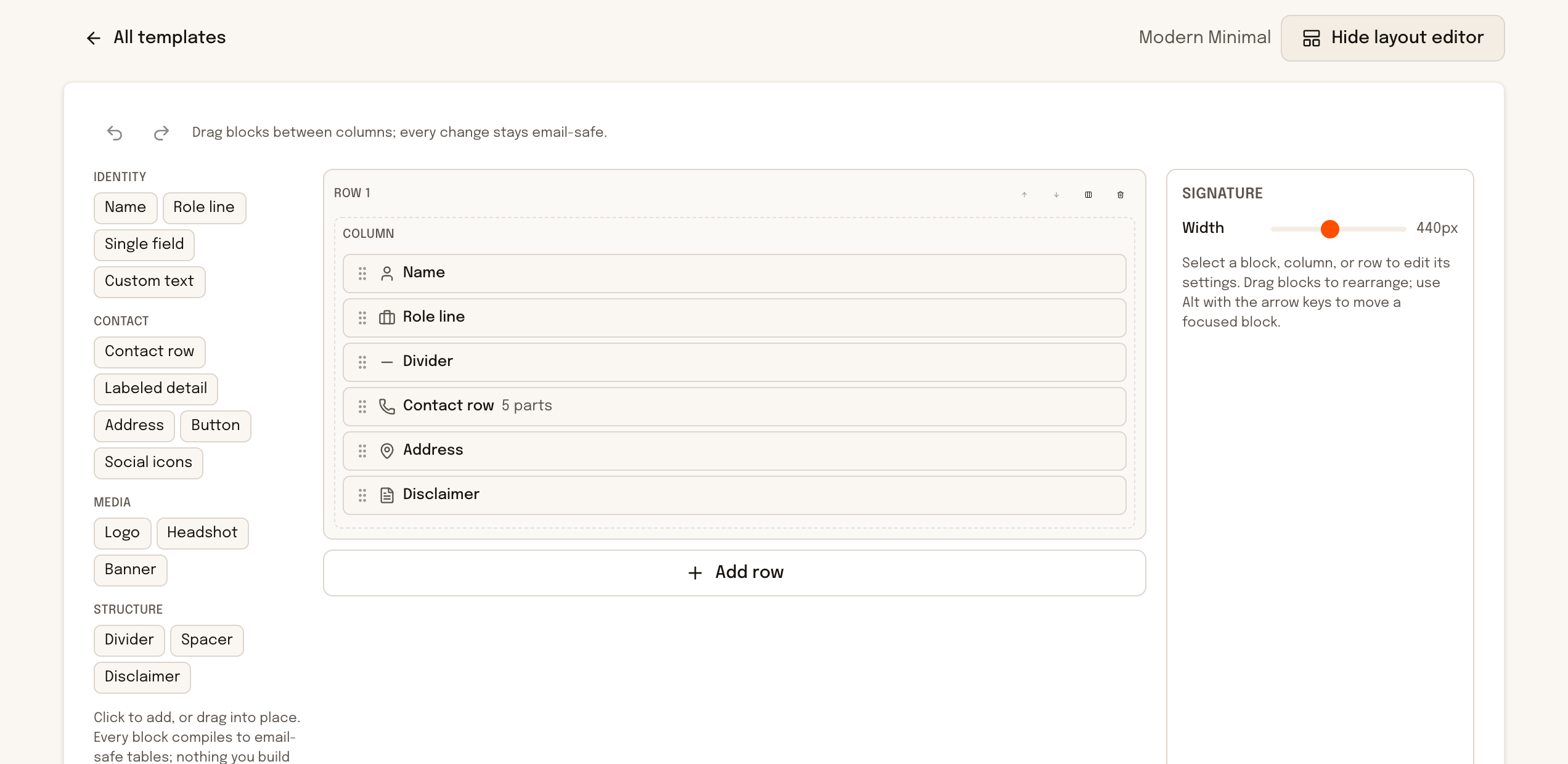
Design once, without a designer
A drag-and-drop block editor with guardrails: safe fonts, brand color roles, and layouts that stay email-safe no matter what you drag where. The preview renders through the same engine that builds the final signature, so what you see is what lands.
- 15 block types, from headshots and banners to disclaimers
- Undo, redo, and keyboard-first controls
- Output renders cleanly in Gmail, Outlook, and Apple Mail
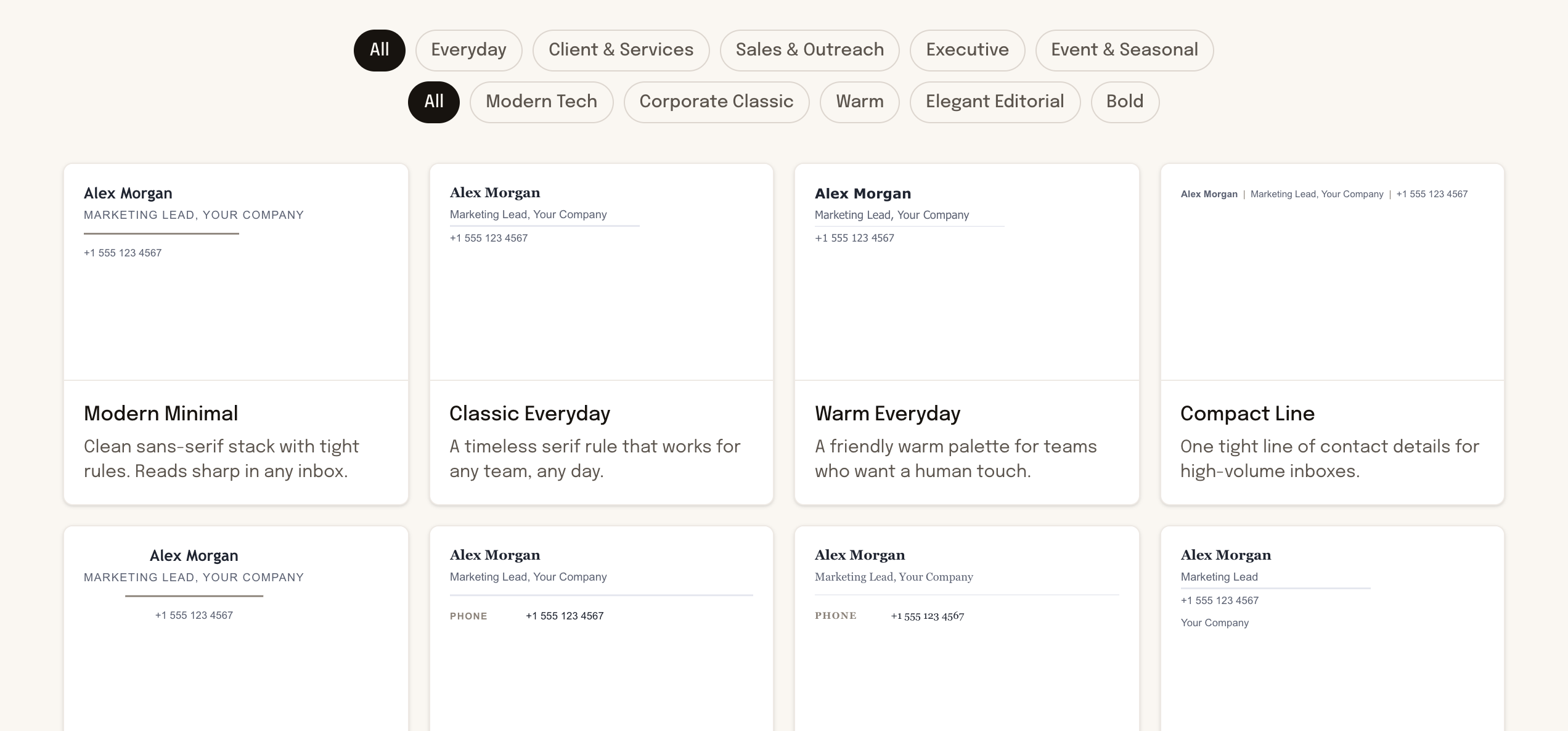
Start from 32 curated templates
Five business categories, five style families, all rendered through the same email-safe engine. Pick a starter, apply your brand, then lock it as the one master template your whole team shares. Brand fields stay locked; teammates fill in only their name, title, and contact details.
- Filter by category and style
- Restyle the whole signature with one theme switch
- Locked brand fields, editable personal fields
Everything else your team gets
CSV member import
Bring the whole roster in one upload, with a column remapper for whatever your HR export looks like.
Image slots with history
Swap the logo once and every installed signature updates on its next send. Old versions stay restorable.
A campaign banner slot
Run a launch or event banner across every signature, then retire it, without touching anyone's install.
Automatic update emails
Change the master template and every member gets a fresh personal link, sent only when you choose.
Install guides per client
Step-by-step guides for Gmail, Outlook new and classic, Apple Mail, and iPhone, written for the least technical person on the team.
Member pages, no accounts
Each teammate gets a private link with a live preview. No passwords, no seats to provision, nothing to deprovision later.
Your next hire shouldn't change your bill.
Flat pricing by team band. Every feature on every plan.
No credit card. No per-seat math.
Your signature doesn't spy on anyone
Most tools in this category sell tracking: pixels in your signature, open rates on the people you email, click analytics on your colleagues' conversations. We think that's a bug, not a feature.
Signatures made here contain no tracking pixels and no analytics of any kind. Recipients see a signature, not a surveillance device, and there is nothing for Apple Mail Privacy Protection or ad blockers to strip, flag, or slow down.
The same stance runs through the whole product: we never read your mail, and we never watch theirs.
Flat pricing for the whole company
Pick a band, not a headcount. Every plan includes every template and feature, and it is never priced per seat.
Frequently asked questions
Email signature management is software that keeps every employee's email signature consistent with company branding. An admin locks one master template, each teammate gets their own signature generated from it, and changes to the logo, banner, or layout reach everyone without per-machine installs or IT tickets.
No account, no password, nothing to install. Admins invite teammates by email, each teammate opens a personal link and fills in their own name, title, and contact details, that is it.
Gmail, Outlook (new and classic), Apple Mail, iPhone Mail, and the Gmail mobile app. Each has a short install guide with exact steps for that client.
We send a check email to a private address for your workspace. When it arrives, we look for your signature's image URL and match it to your account, confirming the signature is really installed, not just copied. No browser extension, no OAuth, no access to your inbox.
Never. You pay a flat price for a band of members (Small, Growth, or Scale). Adding a teammate inside your band does not change your bill.
Yes. Update the logo once in the dashboard, and every signature using it, already installed in every teammate's email client, updates automatically. No one has to reinstall anything.
Yes, free forever, no signup, no time limit. A free account unlocks the drag-and-drop layout editor. Paid plans exist for teams that want a locked brand, personal links for every teammate, and install verification.
Each teammate gets a personal link to their finished signature and pastes it into their own email client's signature settings. Gmail, Outlook, and Apple Mail all support this natively, so there is no browser extension, no OAuth grant, and no mail-flow rule. Step-by-step guides cover every client.
Your workspace gets a private check address. A teammate sends one email to it, and we scan that single message for the signature's fingerprint: image URLs, links, and structure. We only ever see email that is deliberately sent to us, and we mark the member verified when it matches.
Ready to get started with CompanySignatures?
Try it free, right in your browser. No sign-up required.
- Free to use
- No sign-up needed